Made for Pakistan

Pakistan's complete salon management app.

SalonPro brings staff attendance, daily billing, dues, reports and notifications into one easy app for iOS and Android. Built for Pakistani salon owners and barbers who want to spend less time on paperwork and more time growing the shop.
Salons
50+
Languages
EN, UR
Platforms
iOS, Android
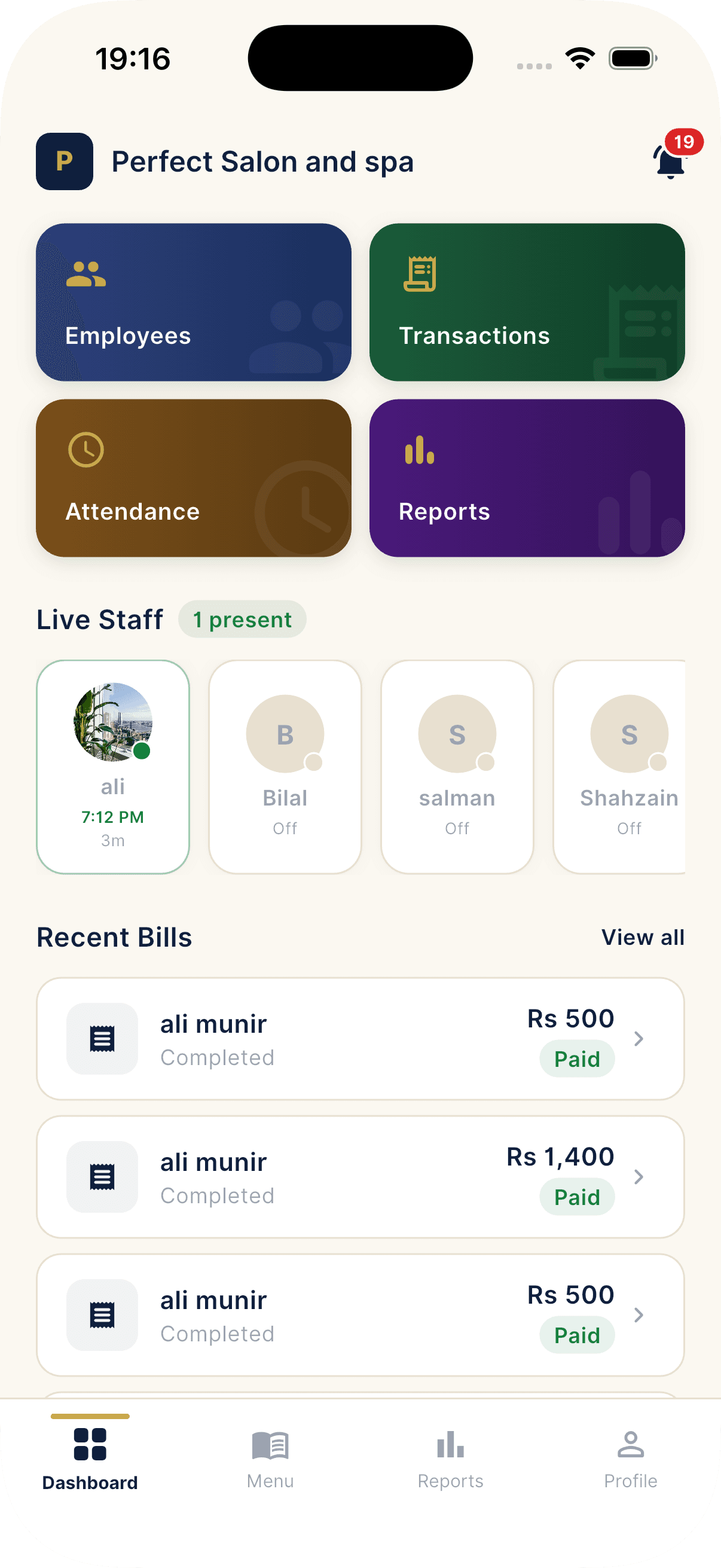
SalonPro owner dashboard with live revenue, staff attendance and recent bills

Trusted by 50+ salons across Pakistan

From single-chair barber shops in Lahore to multi-branch salons in Karachi.

How SalonPro works

An end-to-end platform for owners and staff

SalonPro replaces the register notebook, the WhatsApp roster, and the "hisaab kitaab". One app that works offline and syncs the moment you are back online.

01

Onboard your salon in minutes

Sign in with your phone, add your salon name, working hours and starting menu. Invite employees with a QR code so they can download the app, scan, and start working the same day.

02

Run the day from one screen

Owners and employees see live check-ins, open bills, dues and notifications. Everything you do (bills, payments, attendance overrides) syncs instantly across every device.

03

Get paid, settle dues, see the growth

Accept cash, JazzCash or EasyPaisa at the counter. Pay employees and track dues in the app. Open reports to see month-over-month growth, top services, and best staff.

Everything in the app

Built feature by feature for real salons

Not a generic point of sale. Every flow below is a real screen in the SalonPro app, designed around how Pakistani salons actually run their day.

Onboarding and accounts

Phone OTP, role-based flows, and an employee invite QR.

  • Phone OTP login for Pakistani numbers
  • Secure session management with auto-renewal
  • Separate owner and employee experiences
  • Owner onboarding: name, address, working hours, location, photos
  • Employee invite via QR code (scan to join)
  • Employee profile setup on first join
  • Waiting-for-approval state until wage is configured

Staff and attendance

Every check-in, override, and wage rule in one place.

  • One-tap employee check-in and check-out
  • Live attendance view of who is currently in
  • Owner manual override with reason and audit trail
  • Wage types: daily, weekly, or monthly per employee
  • Per-employee base pay and commission percentage
  • Per-employee maximum discount cap
  • Automatic check-out at end of day for stragglers
  • Date-range attendance export

Billing and transactions

Punch a bill in seconds with services, tips, splits, screenshots.

  • Bill capture with customer name and phone (optional)
  • Add multiple services from the menu in one bill
  • Tip captured separately from bill total
  • Auto commission calculation per service
  • Payment types: cash, EasyPaisa, JazzCash
  • Discounts with global and per-employee caps
  • Screenshot upload for non-cash payments
  • Bill status flow: open then completed
  • Flag suspicious bill with reason for owner review
  • Cancel bill with reason and cancelled-by user

Dues, payments and payroll

Every rupee owed to or by every employee, tracked, not guessed.

  • Automatic dues tracking from commission and base pay
  • Per-employee balance with total dues, paid and outstanding
  • Record payment against employee dues with note
  • Payment history with running balance
  • Wage-type aware settlement (daily, weekly or monthly)
  • Owner-only payroll export on the Pro plan

Menu management

Reorderable services with durations and categories.

  • Drag and drop reorder of services
  • Price, category and duration per service
  • Active or inactive toggle without deleting history
  • Edits visible to staff in real time

Reports and analytics

Charts that show where the money actually comes from.

  • Daily, weekly and monthly aggregated reports
  • Custom date-range report builder
  • Per-employee performance: bills, earnings, commissions
  • Top services by revenue and frequency
  • Payment method breakdown (cash vs mobile money)
  • Discount cost trend analysis
  • Daily revenue trend chart over the last N days
  • Employee comparison chart
  • Employee daily-earnings chart
  • Dues balance history per employee
  • PDF report export on the Pro plan

Notice board and notifications

Staff sees announcements the moment they open the app.

  • Notice board with pinned and colored notices
  • 8 background colors and foreground options for notices
  • Pin, unpin, show and hide notices without deleting
  • Push notifications for check-in, check-out, bill, discount
  • Configurable daily summary push at a custom time
  • New-employee alerts
  • SMS broadcast to customers with delivery tracking
  • Targeted push to staff currently checked in
  • Notification inbox with read and unread tracking
  • Per-salon notification settings

Profile, gallery and branding

Make the salon look like your salon, photos and all.

  • Salon name, phone, city and address
  • Latitude and longitude pinned on a map
  • Working hours: start and end time
  • Number of chairs or spaces
  • Logo upload with fast CDN delivery
  • Photo gallery with reorderable images and captions
  • Photo limits per plan: 2, 10 or 50
  • Global discount cap to prevent over-discounting

Subscriptions and web checkout

Upgrade in-browser. Plan activates the moment payment confirms.

  • Three plans: Free, Pro and Chain
  • Plan-feature gating (reports, payroll export, notifications, Urdu, multi-branch)
  • Headcount limits per tier
  • Out-of-app checkout for compliance and convenience
  • Pay with card via Stripe
  • Pay with JazzCash
  • Pay with EasyPaisa
  • Bank-transfer fallback with manual approval
  • Customer Portal for invoices and card updates
  • Billing history with hosted PDF receipts
  • Plan lifecycle with grace period and auto-downgrade
  • Server-computed banner for plan expiry alerts

Offline-first and real-time

Bad signal? No problem. Good signal? Everyone is in sync.

  • Offline operation queue for bills, check-ins and dues
  • Automatic replay in original order on reconnect
  • Per-operation retry counter with backoff
  • Live updates over the wire while you work
  • Real-time check-in and check-out broadcast
  • Real-time bill creation broadcast
  • Real-time wage and plan update broadcast

Localization and UX

Built for thumbs, and for shop floors that speak Urdu.

  • One-tap Urdu UI toggle on the Pro plan
  • Currency formatted in Pakistani Rupees
  • Smart abbreviations for big numbers (K and M)
  • Material Design 3 with custom navy and gold tokens
  • Inter font throughout, optimised for legibility
  • Skeleton loaders while data fetches
  • Inline error states with retry

Security and privacy

Encrypted in transit, encrypted at rest, fully auditable.

  • Phone OTP login with brute-force protection
  • Rotating session tokens with abuse detection
  • Encrypted local storage for sensitive data
  • Role-based access for owners and employees
  • Audit log of every sensitive action
  • Privacy-first design, your data is yours
  • TLS encryption for all network traffic

Inside the app

Designed for thumbs, not boardrooms

Big readable type, one thumb-zone CTA per screen, and the same flow on iOS and Android. Owners get a powerful dashboard, employees get a clean job sheet.
For salon owners

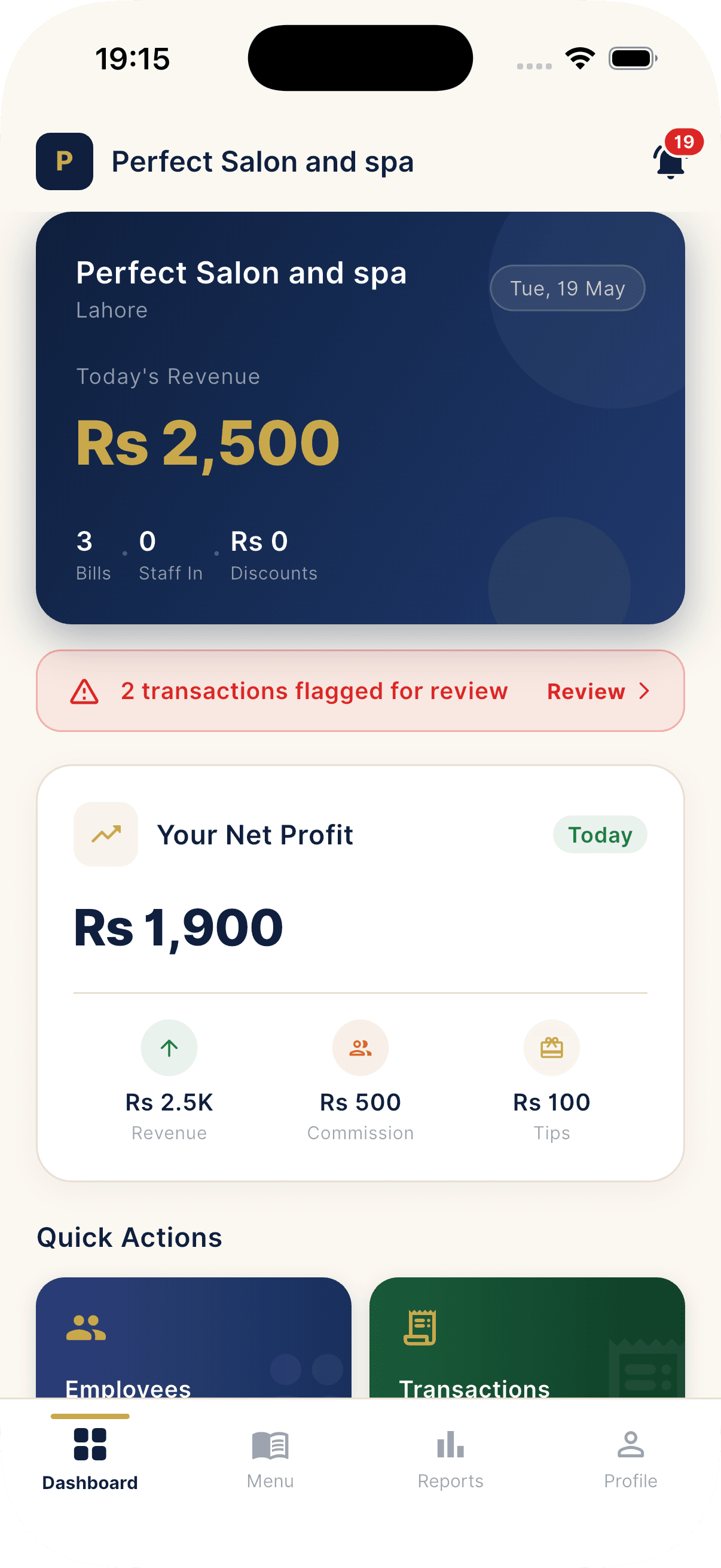
SalonPro owner dashboard

Dashboard

Today at a glance

Live revenue, bill count, staff in, net profit and quick actions, all on the home screen.
For salon employees

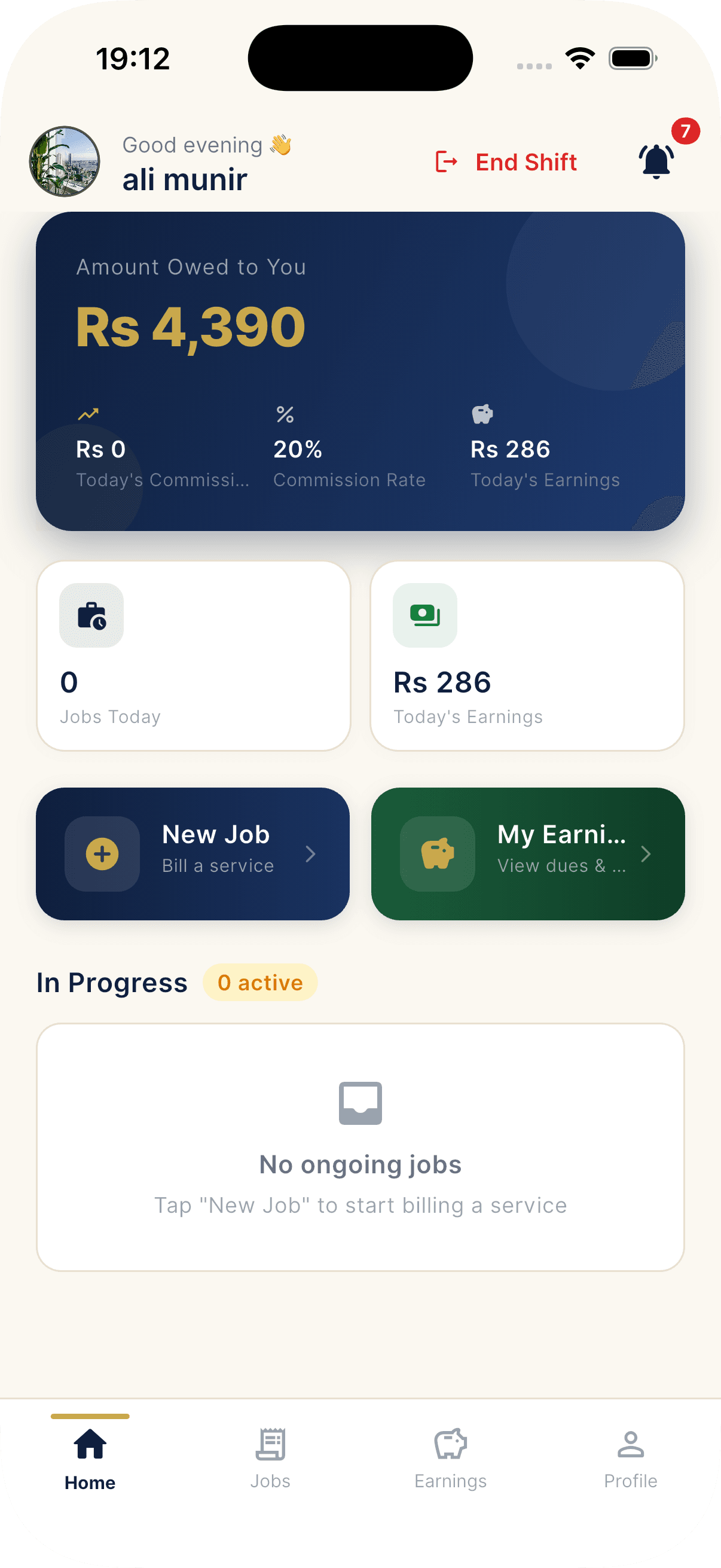
Employee home screen

Employee home

Earnings at a glance

Today's commission, monthly earnings and amount owed, all on the first screen.

Payment methods for Pakistan

Every way Pakistan actually pays

Upgrade to Pro or Chain from inside the app and pick the gateway you already trust. Your plan activates automatically as soon as the payment confirms.

Card

Stripe (Card)

International and local cards. Card data is handled by Stripe with hosted invoices and automatic receipts in your billing history.

Wallet

JazzCash

Pakistan's largest mobile wallet. Pay from your JazzCash balance or any linked bank in seconds.

Wallet

EasyPaisa

Pay via your EasyPaisa account or any partner bank — fast checkout for Pakistan customers.

Manual

Bank transfer

A manual fallback for the rare case nothing else works. Submit your bank reference and we activate after approval.

Pricing

Simple salon software pricing, in rupees

No hidden fees. No transaction percentage. No contracts. Cancel any time from inside the app and your plan stays active until the period ends.

Free

Rs 0/ forever

Try the full workflow with light limits. Perfect to evaluate the app.

  • Up to 3 employees
  • Up to 2 gallery photos
  • Phone OTP login
  • Daily check-in and check-out
  • Bill capture with services and tips
  • Cash, EasyPaisa and JazzCash payments
  • Basic dues tracking
  • Notice board and in-app inbox
  • Offline-first sync
  • Not included

    Reports · Notifications · Urdu UI · Payroll export · Multi-branch

Start free
Most popular

Pro

Rs 100/ per month

Everything in Free plus unlimited staff, full reports and notifications.

  • Unlimited employees
  • Up to 10 gallery photos
  • Full daily, weekly and monthly reports
  • Custom date-range report builder
  • Per-employee performance and comparison charts
  • Top services and payment-mix analysis
  • PDF report export
  • Push notifications (check-in, bill, discount, summary)
  • Configurable daily summary time
  • SMS broadcast to customers
  • Urdu UI toggle
  • Payroll export
  • WhatsApp support during business hours
Request demo

Chain

Rs 2,999/ per month

Multi-branch operators with consolidated reporting and priority support.

  • Everything in Pro
  • Multi-branch dashboard
  • Up to 50 gallery photos
  • Cross-branch reports and comparisons
  • Priority WhatsApp support
  • Dedicated onboarding session
  • Custom plan caps on request
Talk to sales

Upgrade from inside the app and pay with Stripe (card), JazzCash, EasyPaisa or bank transfer. Your plan activates automatically as soon as the payment confirms.

FAQ

Common questions about SalonPro

Could not find what you are looking for? Tap the WhatsApp button. We usually reply within an hour during business days.

Which platforms does SalonPro run on?

Both iOS and Android. The owner app and employee app share the same flow and the same look on every device.

Does SalonPro work in Urdu?

Yes. Pro and Chain plans include a one-tap Urdu UI toggle. Each user (owner or employee) can pick their own language.

Which payment methods are supported for the subscription?

JazzCash, EasyPaisa, international and local cards via Stripe, and a manual bank-transfer fallback. Your plan activates automatically as soon as the payment confirms.

Can I use SalonPro offline?

Yes. Bills, check-ins and dues operations are queued in encrypted local storage when you are offline and replay in original order the moment connectivity returns.

How does the employee invite work?

From the owner app, generate a QR code. The employee installs SalonPro, logs in with their phone, and scans the QR. They appear in your dashboard immediately and start working as soon as you configure their wage.

How are commissions and dues calculated?

Each employee has a wage type (daily, weekly or monthly), a base pay, a commission percentage, and a maximum discount cap. Commission is calculated automatically as bills are completed and the running dues balance updates live for both you and the employee.

Can owners cancel or flag a wrong bill?

Yes. Bills can be cancelled with a reason and a full audit trail, or flagged for review without being deleted. The record stays for reporting and audit.

What can the Reports section show me?

Daily, weekly, monthly and custom-range reports. Charts for daily revenue trend, employee comparison, employee daily earnings, dues history, top services, payment-mix donut, and discount-cost trends. PDF export is available on Pro.

How many employees and photos can I add per plan?

Free covers 3 employees and 2 gallery photos. Pro is unlimited employees with 10 photos. Chain is unlimited employees with 50 photos plus multi-branch support.

What happens when a subscription expires?

Pro and Chain enter a short grace period after the billing date, then auto-downgrade to Free overnight. You do not lose data. Features that are not on Free just become read-only or hidden until you renew.

How do I upgrade the plan?

Tap Upgrade in the app. It opens an external browser to a secure checkout page. Pick a gateway, complete payment, and the plan activates as soon as the payment confirms.

How are payments inside the salon recorded?

When you complete a bill you pick the payment type: Cash, EasyPaisa, or JazzCash. For non-cash you can attach a screenshot of the transfer for owner review. The bill, tip, commission split, and discount are all stored.

Are notifications customisable?

Yes. Owners can toggle check-in alerts, bill alerts, discount alerts, new-employee alerts, and a daily summary at a custom time (default 22:00). All notifications go through reliable push delivery with multi-device support.

Is my data safe?

All app traffic is encrypted in transit. Local data is encrypted at rest. Every sensitive action is recorded in the audit log with the actor and timestamp. Role-based access keeps owner data separate from employee views.

Can I use SalonPro for multiple branches?

Yes, that is the Chain plan. You get a multi-branch dashboard with consolidated reports across all your locations.

Do I need to pay any setup or per-transaction fees?

No setup fees and no per-transaction percentage. You pay only the monthly plan price in rupees. Cancel any time from inside the app.

Request a demo

See SalonPro in your shop.

Drop your details and a SalonPro specialist will set up a free walkthrough, either on a call or at your salon if you are in Lahore, Karachi or Islamabad.

  • 30-minute personalized walkthrough
  • Free menu + employee setup on Pro trial
  • WhatsApp support during your first month
  • Cancel any time, no contracts

By submitting this form you agree we may contact you about SalonPro. We never sell or share your details.